

Creating Code 32 Barcodes
Code 32 (also known as Italian Pharmacode) is a specialized 1D barcode symbology used primarily in Italy to identify pharmaceutical products and medical supplies. Built on top of the Code 39 structure, Code 32 encodes 8 numeric digits plus an automatically calculated check digit, typically prepended with an "A" on human-readable labels.
Using iBarcoder makes generating, customizing, and printing compliance-ready Code 32 barcodes fast and accurate.
Step-by-Step: How to Generate Code 32 Barcodes
1. Select Code 32 Symbology:
Open iBarcoder and click the Barcode icon in the toolbar to add a new barcode object to your label canvas. In the Barcode Type dropdown menu within the Barcode Properties Panel, select Code 32.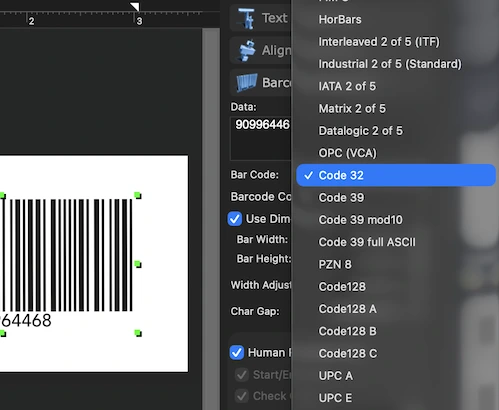
2. Input Your Numeric Data:
Navigate to the Data tab in the Barcode Inspector. Enter your 8-digit product code into the text field. iBarcoder will handle the internal conversion and check-digit calculation automatically.3. Customize Appearance & Dimensions:
Adjust the height, bar width (X-dimension), margins, and quiet zones under the Barcode Properties panel. You can also toggle human-readable text on or off, adjust the font style and color settings.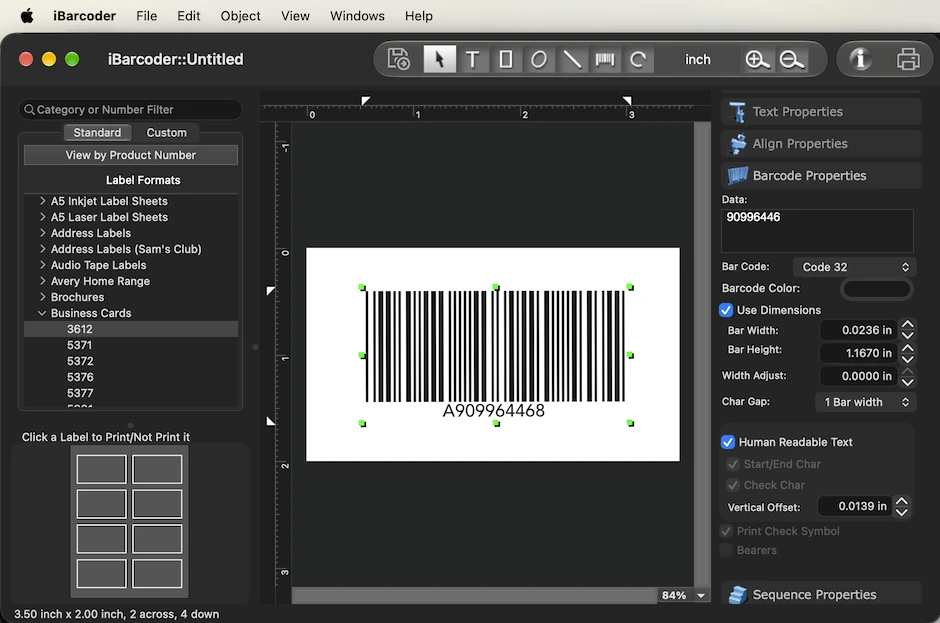
4. Print or Export:
Print your barcode directly to standard label sheets (such as Avery templates) using thermal, laser, or inkjet printers. Alternatively, export vector (PDF, EPS) or high-resolution raster (PNG, TIFF, JPEG) graphic files for packaging design.Key Features for Code 32 Creation in iBarcoder
| Feature | Description |
| Bulk Generation: | Import lists from .xlsx or .txt files to generate thousands of Code 32 barcodes at once. |
| Sequential Counter: | Automatically generate incremental Code 32 sequences using prefix, starting number, and step values. |
| Color Modes: | Switch between RGB and CMYK color spaces in iBarcoder Settings to prevent color conversion issues in professional print workflows. |
| Vector Export: | Output EPS and PDF files to guarantee sharp, 100% scannable print results. |