

Creating Code 39 Barcodes
Code 39 (also known as Code 3 of 9, or Type 39) is one of the most popular and versatile alphanumeric barcodes used in inventory, automotive, healthcare, and defense industries. It is called "Code 3 of 9" because each character consists of 9 elements (5 bars and 4 spaces), of which 3 are wide and 6 are narrow.
Using iBarcoder makes generating, customizing, and printing perfect Code 39 barcodes fast and accurate.
What is Code 39?
- • Type: Alphanumeric (supports uppercase letters A–Z, numbers 0–9, and special characters like -, ., $, /,+, %, and space).
- • Self-Checking: Code 39 is self-checking, meaning standard verification algorithms are built-in, though a modulo 43 check digit is optional for enhanced security.
- • Start/Stop Character: Every Code 39 barcode must begin and end with an asterisk (*) character.
Step-by-Step: How to Generate Code 39 Barcodes
Creating a Code 39 barcode is quite easy when it is done using iBarcoder:1. Select Code 39 Symbology:
Open iBarcoder and click the Barcode icon in the toolbar to add a new barcode object to your label canvas. In the Barcode Type dropdown menu within the Barcode Properties Panel, select Code 39.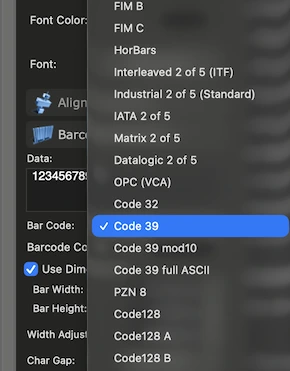
2. Format Your Data:
Ensure your text string only contains supported characters:- • Uppercase letters: A through Z.
- • Numbersg: 0 through 9.
- • Special characters: Space, -, ., $, /, +, %.
3. Customize Appearance & Dimensions:
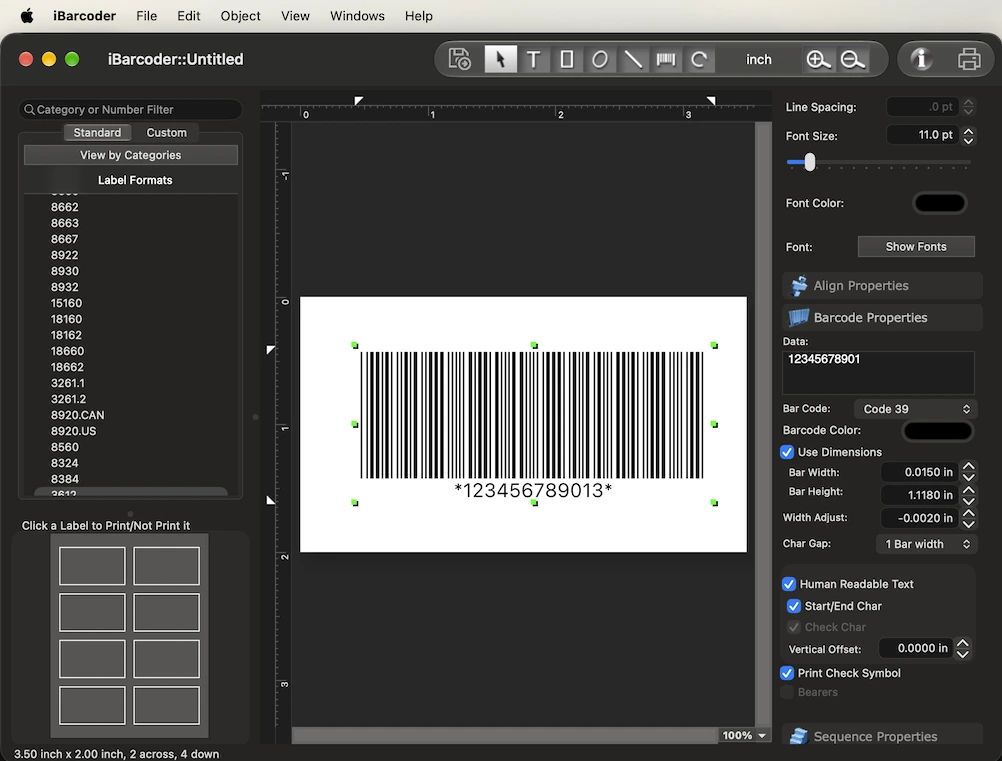
Adjust the height, bar width (X-dimension), margins, and quiet zones under the Barcode Properties panel. You can also toggle human-readable text on or off, adjust the font style and color settings.If you need that the text to contain the Code 39 start Stop characters, then set the Start/End Char attribute to ON under human readable text. This wrapa your text data with asterisks (*).

4. Print or Export:
Print your barcode directly to standard label sheets (such as Avery templates) using thermal, laser, or inkjet printers. Alternatively, export vector (PDF, EPS) or high-resolution raster (PNG, TIFF, JPEG) graphic files for packaging design.Key Features for Code 39 Creation in iBarcoder
| Feature | Description |
| Bulk Generation: | Import lists from .xlsx or .txt files to generate thousands of Code 39 barcodes at once. |
| Sequential Counter: | Automatically generate incremental Code 39 sequences using prefix, starting number, and step values. |
| Color Modes: | Switch between RGB and CMYK color spaces in iBarcoder Settings to prevent color conversion issues in professional print workflows. |
| Vector Export: | Output EPS and PDF files to guarantee sharp, 100% scannable print results. |
Best Practices for Printing Code 39 Barcodes
- • Quiet Zones: Always leave a blank margin (at least 10 times the narrow bar width) on both the left and right sides of the barcode.
- • Size and Scaling: Ensure the barcode isn't printed too small for your scanner to read, especially if using thermal label printers.
- • Contrast: Use black bars on a clean white background. Avoid low-contrast color combinations.
Full ASCII Mode (128 characters): Represents lowercase letters, symbols, and control codes by pairing standard Code 39 characters with a prefix symbol ($, %, /, or +)
A check digit is optional for Code 39. However, for high-accuracy applications (like warehouse logistics or aerospace), enabling a modulo 43 check digit is strongly recommended.
Code 39 Mod 10 is an optional error-checking variant of the Code 39 barcode symbology that appends a single numeric check digit (0–9) to numeric-only data string. It uses a standard modulo 10 algorithm (similar to UPC, EAN, and Interleaved 2 of 5).