

Create EAN-13 Barcodes: Step-by-Step.
Whether you are launching a new retail product, expanding into major supermarkets, or managing inventory,the EAN-13 barcode is the global standard you need. Widely scanned at point-of-sale (POS) counters across Europe, Asia, and beyond, this 13-digit code uniquely identifies your product.
Using iBarcoder makes generating, customizing, and printing perfect EAN-13 barcodes fast and accurate.
What is an EAN-13 Barcode?
EAN-13 (European Article Number, now officially called an International Article Number) is a 13-digit numeric barcode used predominantly for marking retail goods sold at the point of sale.- • Global Acceptance: Accepted by virtually all retail supply chains and online marketplaces (including Amazon).
- • Versatility: Can be printed on product packaging, labels, tags, and display boxes.
- • Compatibility: Easily read by standard laser and image-based barcode scanners.
Anatomy of an EAN-13 Barcode
Before creating your barcode, it helps to understand what the 13 digits actually represent. The structure is divided into four main parts:- 1. Country/Prefix Code (Digits 1–3): Identifies the GS1 Member Organization country where the company prefix was issued (it does not necessarily indicate the country of product manufacture).
- 2. Company/Manufacturer Prefix (Digits 4–7 or 4–8): A unique code assigned to your business.
- 3. Product Item Reference (Remaining Digits): Assigned by the manufacturer to identify a specific product and its variation (e.g., size, color).
- 4. Check Digit (Final 13th Digit): A mathematically calculated digit used by scanners to ensure the barcode was scanned and read correctly.
How to Create Your EAN-13 Barcode
Follow these simple steps to get your barcode ready for production:1. Obtain a Official GS1 Company Prefix:
To use legitimate EAN-13 barcodes that retailers will accept, you must register with GS1, the global authority on barcodes.- • Visit your local GS1 organization website (e.g., GS1 US, GS1 UK, GS1 Germany).
- • Apply for a GS1 Company Prefix.
- • Once approved, you will receive a unique prefix block and access to official numbering guidelines.
2. Assign Numbers to Your Products:
Using your GS1 management portal or internal inventory system, assign a unique product number to each item and variation you sell.Tip: Keep a detailed spreadsheet tracking your product names, SKUs, and assigned EAN-13 numbers to avoid duplication.
3. Generate the Barcode Image:
Once you have your 13-digit number, you need to convert it into a scannable graphic (usually in vector formats like EPS, PDF, or high-res PNG).Export your barcode file for integration into your design software, or instant printing labels from iBarcoder.
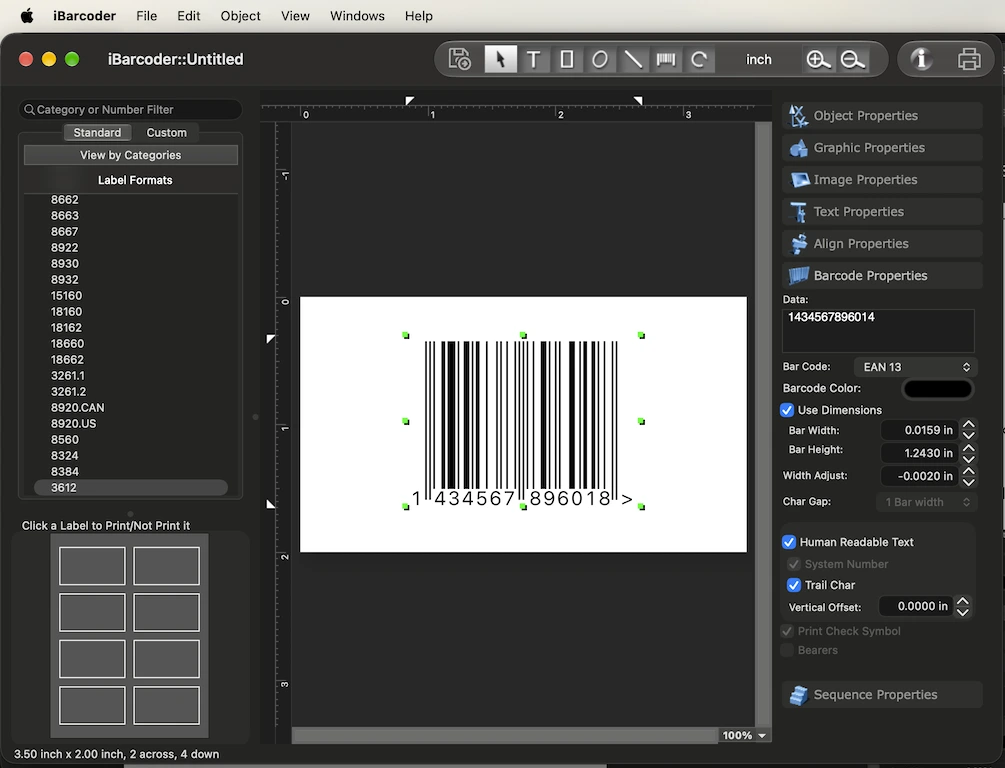
The first digit of the supplement indicates the currency in which the price is expressed.
- • 0 represents a price expressed in British Pounds,
- • 3 = Australian Dollars ($),
- • 4 = New Zealand Dollars ($),
- • whereas a 5 represents a price expressed in U.S. dollars.
- • European publishers often use open pricing, so there is no universal first-digit standard designated explicitly for the euro (EUR) in the legacy EAN-5 specification.
Also, add the full price add-on 51399 instead of just 1399.
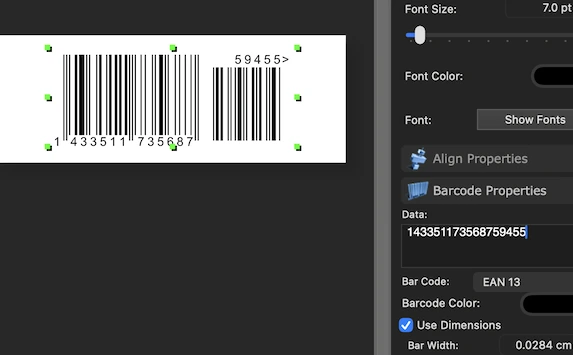
4. Test and Print:
- • Verify Scanability: Print a sample barcode, then scan it using a barcode verifier or industrial scanner to ensure readability before mass production.
- • Check Dimensions: Ensure the barcode meets standard sizing requirements.
- • Maintain Contrast:: Always print black bars on a solid white background to ensure maximum contrast for scanners.
Best Practices for EAN-13 Printing
- • Quiet Zones: Always leave a blank margin (at least 10 times the narrow bar width) on both the left and right sides of the barcode.
- • Placement: Place the barcode on a flat, unobstructed part of the packaging where it won't be folded,creased, or covered by tape.
- • Material Quality: Use durable label materials that won't smudge or fade during shipping, storage, or retail display.