

Create GS1-DataMatrix Barcodes Instantly
Welcome to our GS1-DataMatrix Barcode Generator. Whether you are working in healthcare, retail, or industrial manufacturing, GS1-DataMatrix has become the industry standard for encoding high-density data into a small footprint.
What is a GS1-DataMatrix Barcode?
A GS1-DataMatrix is a two-dimensional (2D) matrix barcode that follows global GS1 standards. Unlike traditional 1D linear barcodes, a DataMatrix code can store a massive amount of information—including product identifiers, batch/lot numbers, expiration dates, and serial numbers—while taking up a fraction of the space.- • High Data Capacity: Can hold up to 3,116 characters from the entire ASCII set.
- • Space Efficient:: Ideal for small items like surgical instruments, pharmaceutical packaging, and electronic components.
- • Error Correction: Built with advanced Reed-Solomon error correction, ensuring readability even if the barcode is up to 30% damaged or smudged.
- • Regulatory Compliance: Meets global compliance standards set by the FDA, EU Falsified Medicines Directive (FMD), and healthcare bodies (such as HIBCC/GS1).
Key Information Encoded (GS1 Application Identifiers)
GS1-DataMatrix barcodes use Application Identifiers (AIs) in parentheses to define the meaning of the data elements encoded. Common AIs include:| Application Identifier | Description & Format |
| (01) | Global Trade Item Number (GTIN) — 14 digits |
| (17) | Expiration Date (YYMMDD) — 6 digits |
| (10) | Batch or Lot Number — Variable length (up to 20 characters) |
| (21) | Serial Number |
The full list of Application Identifiers can be found on GS1 site.
How to Create a GS1-DataMatrix Barcode
1. Select Your Application Identifiers:
Input your GS1 Application Identifiers and corresponding data values (e.g., GTIN,expiry, lot number) and create a barcode data string.2. Format Your Data:
Combine your AIs and data strings in the correct sequence. Note that some AIs have fixed lengths, while variable-length AIs require a FNC1 (Function 1) character delimiter at the end if they are followed by another data field.Let our sample string include next AIs:
-
Global Trade Item Number (GTIN) - (01)
Batch or Lot Number - (10), Expiration date (YYMMDD) - (17), and
Serial Number - (21)
3. Generate the Barcode:
Input your formatted string into the iBarcoder, which natively supports GS1-Datamatrix and automatically inserts the required FNC1 control characters and Start/Stop codes.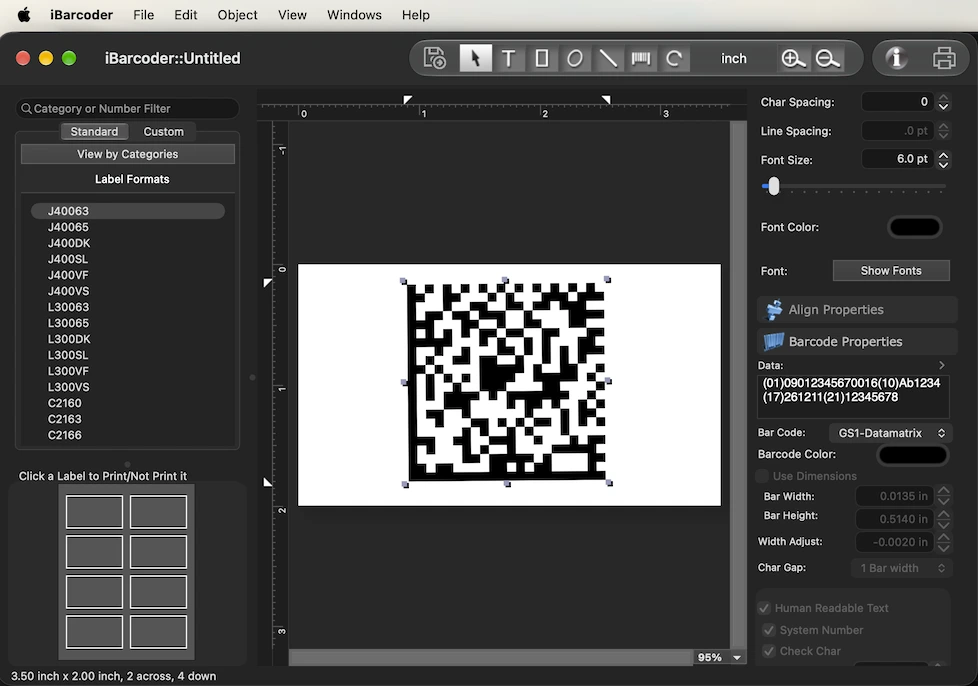
4. Test and Verify:
Print a sample barcode, then scan it using a barcode verifier or industrial scanner to ensure readability before mass production.Best Practices for Printing and Scanning
- • Quiet Zones: Ensure there is sufficient blank space (the "quiet zone") on the left and right sides of the barcode to prevent scanning errors.
- • Contrast: Always use high-contrast printing—typically a black barcode on a white background. Avoid glossy finishes that create glare.
Best Practice Tip: Always test-scan your generated GS1-DataMatrix barcode using a verified 2D imager before mass-printing to ensure optimal readability across your supply chain partners Need help generating your barcode right now? Use the iBarcoder barcode maker to input your Application Identifiers and instantly create your GS1-Datamatrix barcode, or print barcode labels with just created barcode!